
Having my own movie review blog is one thing I’ll never regret.
Anyone can start a movie review blog, but the key is having a genuine passion and love for cinema.
You shouldn’t feel bored—whether you’re recommending a great film or a bad one, or simply expressing exactly how a movie made you feel.
In that context, it doesn’t matter how old you are, what your educational background is, or which degrees are hanging on your wall.
All you need is passion.
Without further ado, let’s break down how to start a movie review blog in 2026.
Let’s spill some tea!
How to Start a Movie Review Blog
Choose Your Movie Niche
First, you need to determine what your movie niche will be—for example:
- Bollywood
- Hollywood
- Korean Movies
- OTT Updates
- Web Series Review
Next, you should create content centered around that specific niche.
For instance, if you prefer Korean movies, at least 60% of your content should focus on them; this helps Google understand that your blog is based on Korean movies and that you discuss them.
If you mix everything into a single blog, you will face issues with Google rankings.
To rank effectively on Google, follow this structural hierarchy:
- Multi Niche: Movies + Tech + Finance + Fitness + Gaming
- Broad Niche: Entertainment
- Single Niche: Movies
- Micro-Niche: Movie Reviews
- Ultra-Micro/Nano: Bollywood Horror Movie Reviews
I highly recommend going with Ultra-Micro/Nano, especially if you are starting out.
Choose a domain name
This is the most critical part of the entire guide—do not skip it.
A domain name is something like “ayushspillstea.com”.
You need to choose a domain that is relevant to your niche; don’t just pick something random.
For example: I used to have a mobile gaming blog—focusing primarily on Android games—which I named “androidadventures.us”.
Later, I created a movie review blog named “flickscheer”; I came up with this by combining synonyms related to movies and films:
- Flick = movie/film
- Cheers = appreciation, excitement, celebration
You can easily create your own domain name this way.
Just use ChatGPT: tell it you are starting a movie review blog and need a good, brandable name. It should include keywords, be SEO-friendly, remain relevant to your niche, and evoke an impressive reaction.
Affiliate Disclosure: Some links in this article are affiliate links. If you purchase through them, I may earn a commission at no extra cost to you. I only recommend products/services I believe are useful for starting a movie blog.
Choosing Web Hosting
What is web hosting?
Just as you need land to build a house, you need online space to create a website; the service from which you rent that space is called web hosting.
There are various types of hosting:
- Shared hosting: Think of this like an apartment—imagine a 10×10 apartment where four people are living together; that is shared hosting.
- VPS hosting: Think of this as having your own floor in a building, where everyone has their own separate apartment.
- Dedicated hosting: Here, the entire building is mine —like Jalwa hai hamara—I own all the resources and the server. This is generally relevant to high-traffic websites and businesses.
There are many options available in the market, such as Hostinger, Cloudways, Bluehost, SiteGround, and GoDaddy.
For beginners, I personally recommend Hostinger. I’ve been using Hostinger since 2021, and my experience with it has been positive. Its relatively affordable plans and guided WordPress setup make it a practical starting point if you’re building your first movie blog.
You don’t need an expensive server when you’re starting. Begin with a suitable shared hosting plan and upgrade as your traffic grows.
Ready to Spill Your Own Movie Takes?
Get your domain, set up WordPress, and start publishing your movie reviews.
Affiliate link: I may earn a commission if you purchase through this link, at no extra cost to you.
Install WordPress

Installing WordPress on Hostinger is generally straightforward:
- Sign up for a Hostinger hosting plan.
- Choose your domain name.
- During setup, select WordPress as your website platform.
- Create your WordPress administrator account.
- Complete the setup.
- Once installation is finished, log in to your WordPress dashboard at: yourdomain.com/wp-admin
You don’t need to manually download WordPress or upload files through FTP when using Hostinger’s guided setup.
Your Blog Is Ready. Now Start Writing.
Domain Connected. WordPress installed.
Now all you have to do is publish your first movie review.
Affiliate link: I may earn a commission if you purchase through this link, at no extra cost to you.
Choose a movie/blog theme
You’ll find many movie review-based themes on WordPress.
Choose one with a good, clean interface.
Make sure it’s fast, or you can create one yourself with Elementor.
Install Essential WordPress Plugins
Add a few essential plugins to improve your movie blog’s SEO, security, performance, and overall functionality.
You don’t need dozens of plugins; install only what your website actually needs.
Recommended plugins:
- SEO: Rank Math or Yoast SEO
- Performance: LiteSpeed Cache / WP Rocket
- Security: Wordfence
- Analytics: Site Kit by Google
- Backups: UpdraftPlus
- Image Optimization: ShortPixel / Smush
This is enough.
Create Important Pages
Before publishing your movie blog, create a few essential pages to make your website look complete, trustworthy, and professional.
- About Us — Tell readers who you are and what your movie blog covers.
- Contact — Give readers a way to get in touch with you.
- Privacy Policy — Explain how your website collects and uses visitor data.
- Disclaimer — Clearly state your relationship with reviews, links, images, ads, and other content.
Pro tip: Keep these pages accessible from your website footer so visitors and search engines can easily find them.
How to write movie reviews
As I mentioned at the start, having a passion for movies is essential; without it, you’ll likely struggle to open up or truly express your thoughts freely.
You don’t need to wear the mantle of a professional critic; present whatever you felt about the movie—whether good or bad—without fear.
This is my Medium profile, BoleTohAyush. You can check out my writing style.
When I first started, I used to get comments like “Improve your grammar, buddy,” and even people around me would criticize me, asking, “Why don’t you do something else, bro?”
But I had a passion and dedication for this, so I didn’t stop. I even wrote movie reviews on Vocal Media; that platform had a great vibe—though it isn’t available in India right now—and it gave me so much: an audience, money, goals, and a way of life.
Anyway…
So, how can you write movie reviews that people actually read, clap for, and share?
Don’t just retell the movie’s story; the audience isn’t coming to your blog to find out what happened in the film. They come to understand your take on the events and why they matter.
Say something new every time.
Discuss the characters, the writing, and what the movie is actually trying to convey.
Which character did you find funny?
What is the film ultimately saying about society, culture, or human nature?
Which part of the film made you pause and think?
“How Death Note Changed My Mind About Anime Forever“—this is a piece I wrote explaining how “Death Note” completely transformed my perspective on anime.
Talk About What the Movie Made You Feel
Just a few days ago, my sister showed me the movie “Bulbbul” on Netflix.
The way the atrocities against Bulbbul were depicted has really stuck in my mind; lately, I’ve even been having nightmares about those same things.
Write about all this too, but keep the experiences and feelings genuine—nothing artificial—because the audience is smart; you’ll get caught out.
You don’t always need to turn your reaction into a perfectly structured film analysis. Sometimes you can ask yourself:
Why did this scene affect me so much?
Why am I still thinking about it?
Was the movie trying to make me uncomfortable?
What does this violence say about the characters, the society they’re living in, or the story itself?
A movie review can be your personal reaction to a film, not just a technical breakdown of cinematography, screenplay and performances.
If a movie made you laugh, say why.
If it made you cry, explain what hit you.
If it made you angry, tell people what triggered that anger.
If it disturbed you enough that you’re still thinking about it the next day, write about that too.
Those personal reactions are often what make a review feel like it was written by a real person rather than generated from a checklist.
So don’t be afraid to say:
“I didn’t like this movie, and here’s why I can’t stop thinking about it.”
That is a take.
SEO for movie-review blogs
First, you need to target the right keywords—specifically those currently being searched for or related to trending movies. For instance, let’s say I search for “Toxic” on Google.
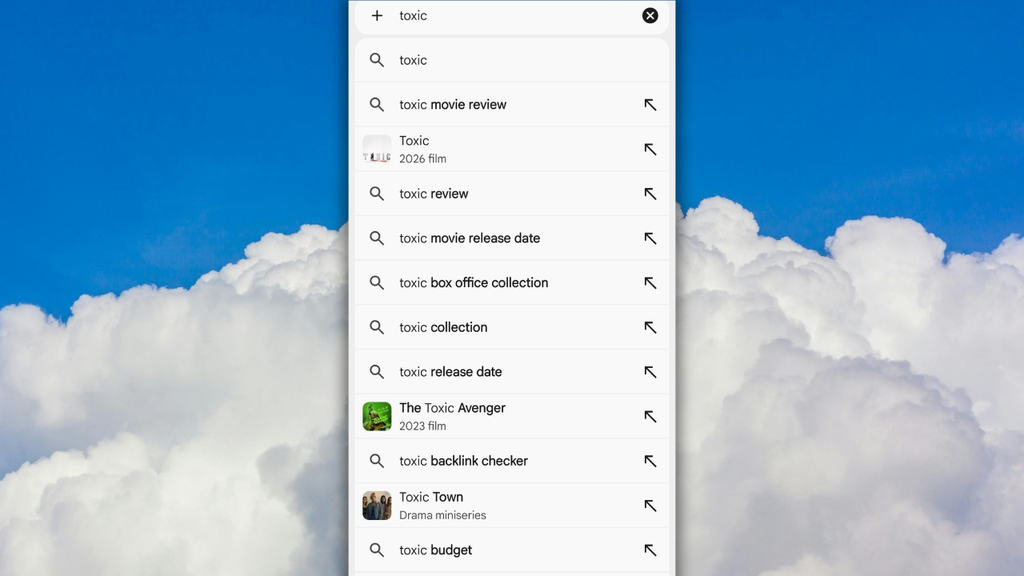
You can see various keywords appearing, such as:
Toxic movie review
Toxic review
Toxic box office collection
Toxic budget
Toxic collection
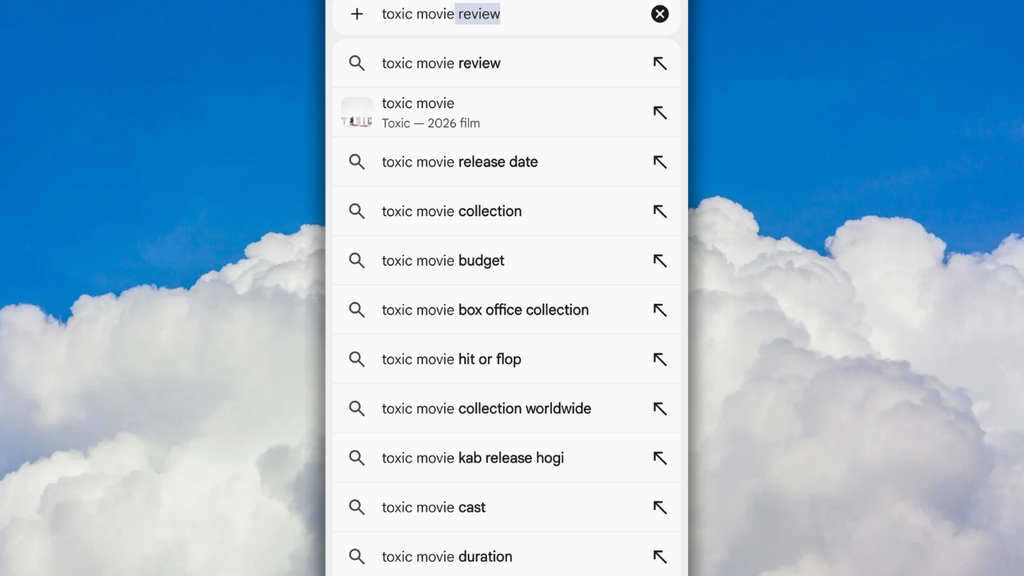
When I type “Toxic movie” into Google, other keywords also pop up, like:
Toxic movie hit or flop
Toxic movie collection worldwide
Toxic movie cast
Toxic movie duration
Create content around these keywords while the movie is trending. Once the trend fades, avoid repeatedly targeting these specific keywords.
Take the movie “Daayra”, for example; it is an upcoming release, and the trailer has just dropped. You could write content like “Daayra trailer review.”
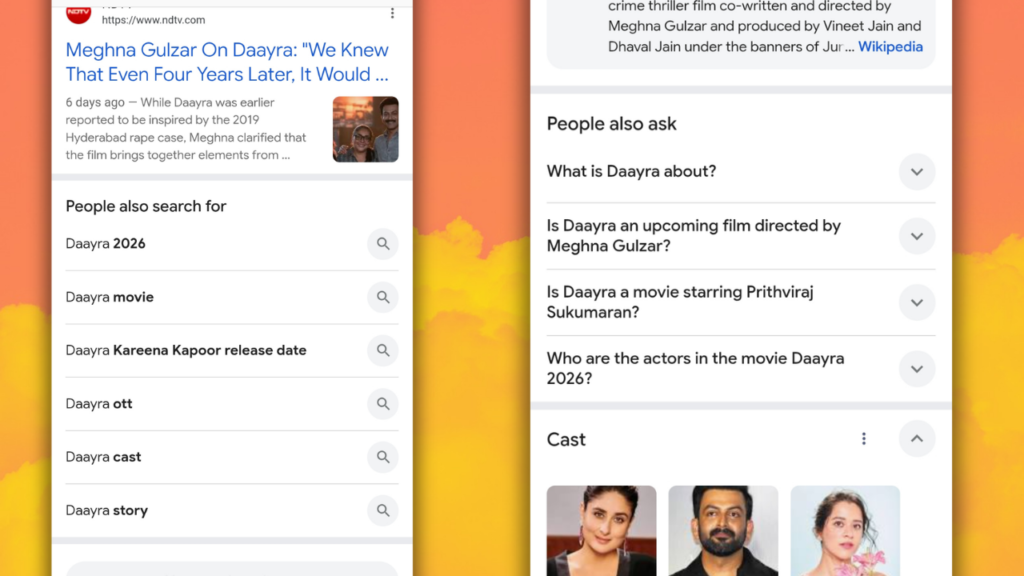
When I search for “Daayra” On Google, I see a list of keywords people are actively searching for—topics where Google indicates insufficient content.
Also, consider the post-theatrical release phase.
Once “Toxic” moves to an OTT platform, you can write about which platform will host it.
You can even engage your audience by asking, “On which OTT platform do you think “Toxic” should be released?”
My suggestion is to share your site’s content across various social media platforms—such as Instagram, Facebook, YouTube, Medium, Snapchat, etc.—using your original links.
This will generate backlinks for your site and increase the chances that Google indexes it faster.
However, it would be incorrect to assume that doing this guarantees your content will rank 100%, as many other factors also matter, such as:
- The quality of your content (high vs. low)
- Whether or not you are plagiarizing content
- Whether the audience is actually reading your content or is even interested in doing so
- How long a reader stays on your blog
…and many other factors.
Write an SEO-friendly title
Instead of:
My Thoughts on This New Movie
Use:
Movie Name Review: Story, Performances, Ending & Verdict
Create useful, original reviews
Don’t rewrite the plot from another website. Give your own opinion about:
- Story & screenplay
- Acting
- Direction
- Music/cinematography
- Pacing
- What worked and what didn’t
- Final verdict
Use headings
Structure the article with headings such as:
- Movie Name Review
- Story & Screenplay
- Performances
- Direction
- Music & Cinematography
- What Works & What Doesn’t
- Final Verdict
- FAQs
Add relevant movie information
Include details like:
- Release date
- Director
- Cast
- Runtime
- Language
- Genre
- OTT platform, when officially available
Use internal links
Link related articles naturally:
If you enjoyed Movie A, check out our review of Movie B.
Optimize images
Use descriptive filenames and alt text instead of IMG_1234.jpg.
Add structured data
Use appropriate schema where applicable, especially Movie and Review structured data. Don’t add fake ratings or information that isn’t actually present on the page.
Build topical authority
Don’t publish random movie reviews and expect lots of traffic. Pick a niche like Bollywood, Hollywood, South Indian movies, K-Dramas, or OTT releases and consistently write about it. Also, link your related articles together so readers and Google can easily discover them.
The main rule
Don’t write for Google first. Write a genuinely useful review for movie fans, then optimize it for search.
How to monetize a movie blog
First and foremost, focus on building traffic for your movie review blog. Once you start getting traffic, you can utilize multiple income sources:
- Display Ads: Earn money based on page views by displaying ads through networks like Google AdSense.
- Affiliate Marketing: Promote affiliate links for OTT subscriptions, movie-related products, web hosting, streaming services, and other relevant products.
- Sponsored Posts: Once you build an audience, production houses, OTT platforms, apps, and entertainment brands may pay you to publish sponsored articles.
- YouTube: Turn your movie reviews into YouTube videos and generate additional income through ads, sponsorships, and affiliate links.
- Premium Content: Offer movie guides, curated watchlists, newsletters, or exclusive content as paid products or subscriptions.
Best Approach: At the beginning, focus on creating high-quality content, publishing consistently, and driving traffic from Google rather than worrying about monetization. Aim to publish 20-30 well-optimized articles first, tract which topics bring the most organic traffic, and then monetize those high-traffic pages with re;evant ads, affiliate links, and other income streams. This gives you a stronger foundation for sustainable blog revenue.
How much does it cost to get started?
You can create your movie site with Hostinger right now for as little as ₹3,000–₹5,000, though there are other hosting providers in the market as well.
Rates vary depending on the tier and plan duration you choose.
Along with hosting, you get a free domain, a free professional Gmail account, a free SSL certificate, and various other premium hosting benefits.
Your basic costs are:
- Domain: ₹500–₹1,500/year
- Web hosting: ₹1,500–₹4,000/year
- WordPress: Free
- Theme: Free themes are enough to start
- SEO plugins: Free options are available
- Logo & graphics: Free with tools like Canva
So, you don’t need to spend thousands on expensive themes or plugins in the beginning. Start small, publish consistently, and upgrade when the blog starts getting traffic.
Can you rank a movie blog with AI-written content?
Yes, but relying entirely on AI isn’t really part of a ranking strategy.
Look Google has openly stated that using AI doesn’t violate its guidelines. What actually matters is that the content is useful, includes a human touch, and is created with the intent of helping people.
In its official guidance, Google says:
“Using AI or automation to generate content with the primary purpose of manipulating ranking in search results is a violation of our spam policies.”
That doesn’t mean you can’t use ChatGPT or other AI tools to help you write.
You can use AI to:
- Brainstorm article ideas
- Find possible angles to explore
- Create an initial outline
- Improve grammar and readability
- Help organize your thoughts
- Research questions you should answer
But your actual movie review should still contain your own experience, opinions, observations and perspective.
If you watched a movie, tell people what you thought about it. What scene stayed with you? What character annoyed you? What worked? What didn’t? Did the ending make sense to you? Did the movie remind you of something from your own life?
That’s the part AI cannot genuinely experience for you.
For example, instead of asking AI to write:
“Bulbbul is a visually stunning film that explores patriarchy and female oppression.”
You could write about what actually stayed with you after watching Bulbbul, what disturbed you, and why certain scenes kept coming back to your mind.
Then you can use AI to help you structure or polish what you already have.
Think of AI as a writing assistant, not the writer.
Google’s guidance is worth reading directly: Google Search’s guidance about AI-generated content
The goal isn’t to hide that you used AI. The goal is to make sure that there is something genuinely yours in the content.
Because if your article could have been written without watching the movie, that’s probably a problem.
Frequently Asked Questions
How much does it cost to start a movie review blog?
The basic cost includes a domain name and web hosting. You can start with a beginner-friendly hosting plan and upgrade later as your website grows.
Do I need coding knowledge to start a movie review blog?
No. You can create a movie review blog using WordPress without knowing how to code. Most of the setup can be done through a visual dashboard.
Which hosting is best for a movie review blog?
For beginners, a reliable WordPress hosting plan is usually enough. Hostinger is one option you can consider because it provides WordPress installation and hosting management tools in one place.
Can I use Hostinger to create a movie review website?
Yes. You can use Hostinger to host a WordPress-based movie review website and publish reviews, lists, news, and other entertainment content.
Can I monetize a movie review blog?
Yes. Once your website starts getting traffic, you can explore monetization methods such as display advertising, affiliate marketing, sponsored content, and other relevant opportunities.
How long does it take to create a movie review blog?
The basic website can be set up in a few hours. Building consistent traffic takes much longer and depends on your content quality, SEO strategy, competition, and publishing consistency.
Can I change my hosting plan later?
Yes. You can generally upgrade your hosting as your website grows and requires more resources.
Is WordPress free for a movie review blog?
WordPress software itself is free, but you still need web hosting and usually a domain name to run your own website.
Can I start a movie blog without buying a domain?
You can publish on free blogging platforms, but if you want to build a proper long-term brand, using your own domain is the better option.
Can a movie review blog make money?
Yes, but traffic and consistent content are the biggest factors. A new movie blog should focus on building useful, original content before expecting significant revenue.
Ready to Start Your Movie Blog?
You already have the ideas and the passion for movies. Now it’s time to turn them into your own website.
With WordPress and reliable hosting, you can set up your movie blog and start publishing your reviews, rankings, recommendations and other movie content.
Start Your Movie Blog with Hostinger
Hostinger offers beginner-friendly hosting with WordPress setup, making it easier to get your movie website online without dealing with complicated technical steps.
This is an affiliate link. If you purchase through this link, I may earn a commission at no additional cost to you.